Appearance
Dashboard
What it's for
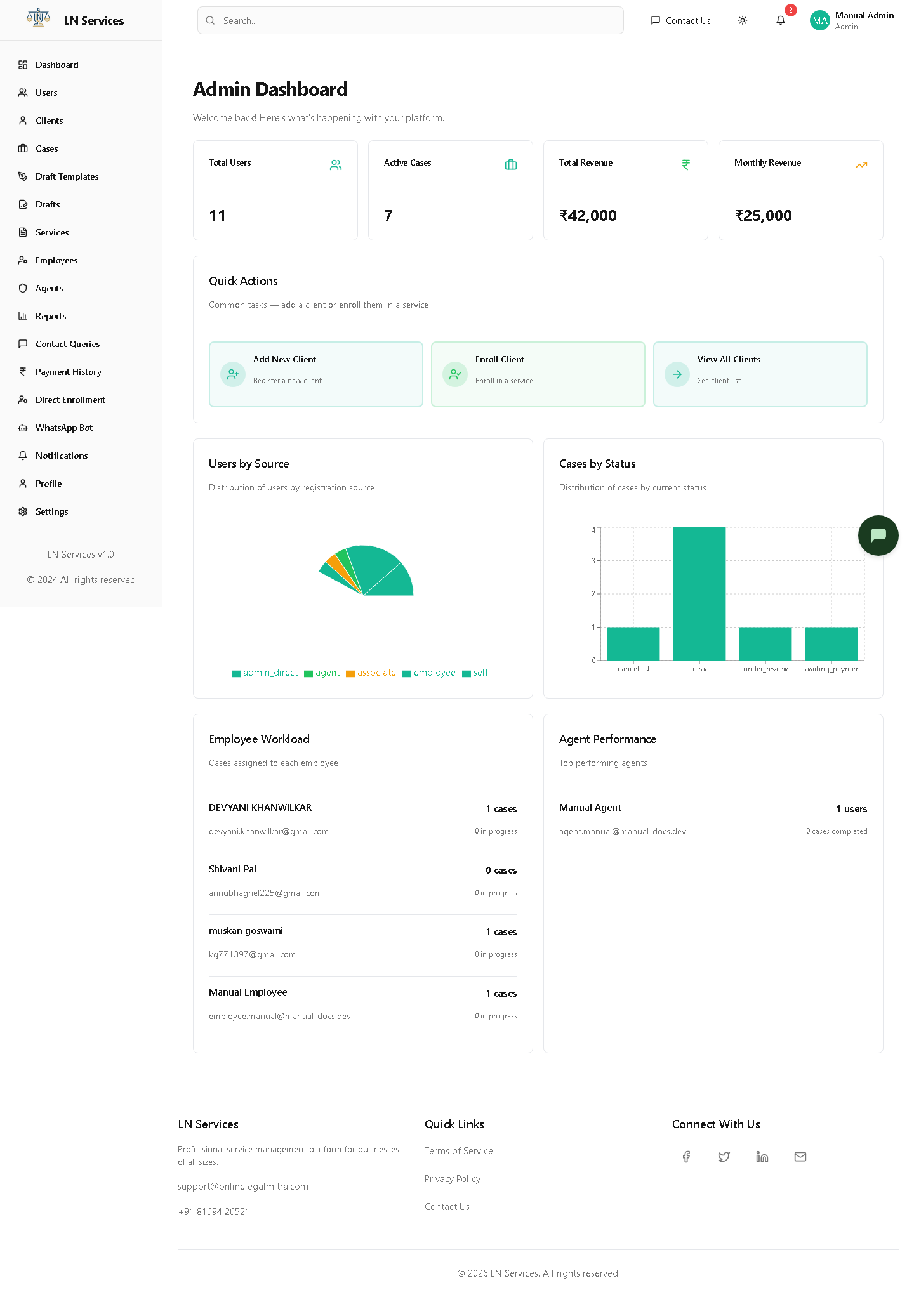
Your landing page after login. A quick snapshot of the platform — how many users, how many active cases, revenue — plus three shortcuts to the most common task: adding and enrolling a client.
What you're looking at
- Stat cards — Total Users, Active Cases, Total Revenue, Monthly Revenue.
- Quick Actions — three buttons: Add New Client, Enroll Client, View All Clients. These just jump you to the Clients page (the first one also opens the "Add Client" form directly).
- Users by Source / Cases by Status — pie and bar charts.
- Employee Workload / Agent Performance — the top 5 busiest employees and top 5 performing agents.
Steps: jump straight to a common task
- Click Add New Client to go straight to the Clients page with the "Add Client" dialog already open.
- Click Enroll Client or View All Clients to go to the Clients page (see Client Management).
Technical Notes
Loads once via adminService.getDashboard() → GET /api/admin/dashboard. The response aggregates totalUsersBySource, totalCasesByStatus, revenue.total/revenue.monthly, plus employees[] and agents[] workload/performance arrays — all computed server-side, nothing here calls a separate endpoint per widget.